Websites for architecture practices
An architecture practice's website is where the work speaks for itself. We build portfolio sites that tell each project through its images, its credits and its story — and that open quickly despite the large photographs. Below you will find what we do, why we do it, and our live demo site.
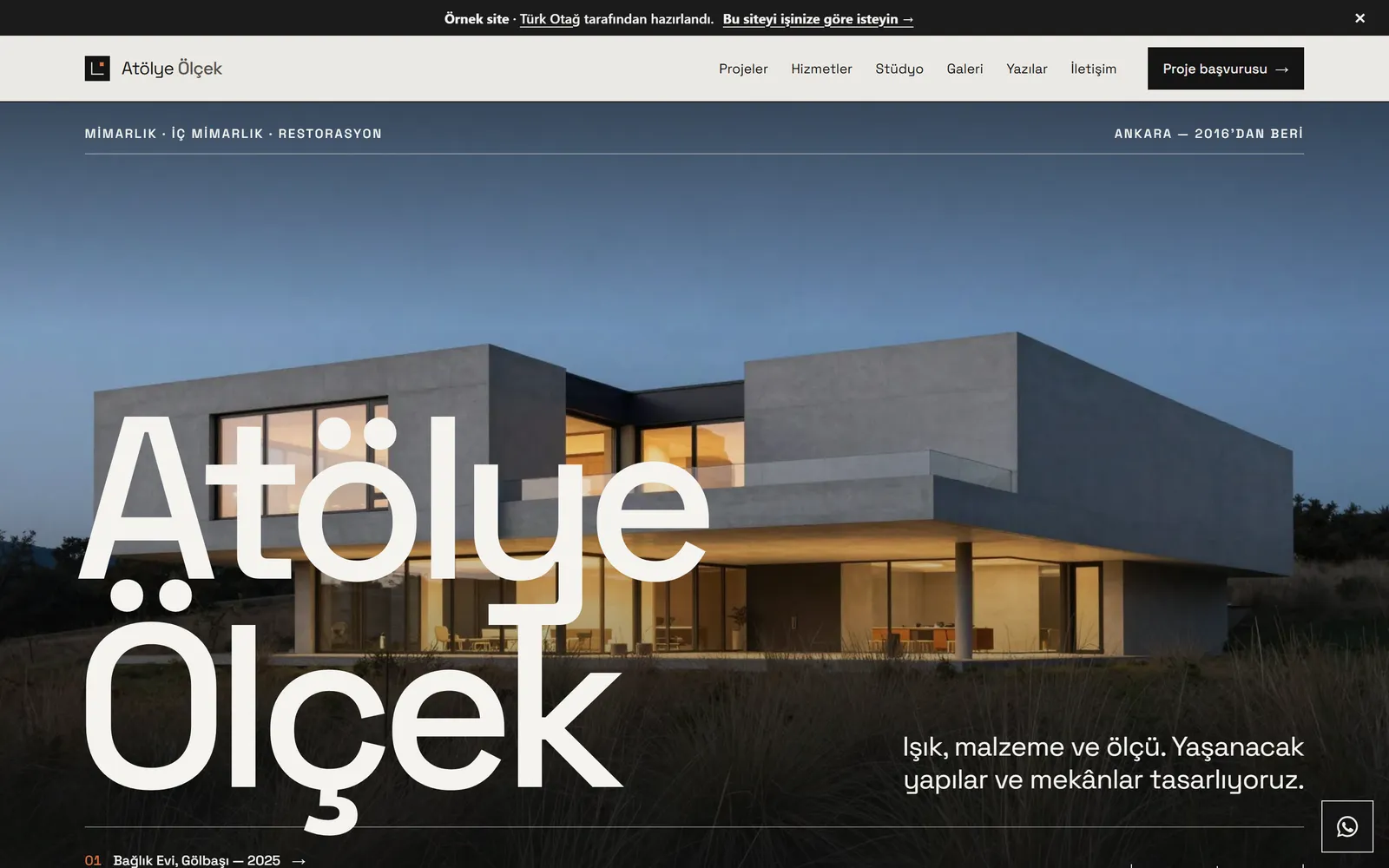
An architecture practice’s website is a portfolio that tells the practice’s work in images and words, is found when people search, and invites new commissions. A good architect’s website brings three things together: pages that present each project with its credits and process, images that are large yet load quickly, and a calm voice that says who the practice is. We build all three without off-the-shelf themes, in the practice’s own design language.
On this page we explain how we work with architecture and interior design practices. You can see most of it live on the demo architecture site we built for a fictional studio — it is a Turkish-language example, but the structure and the speed speak for themselves. For our general approach and other sectors, see our web design service.
The pages an architecture practice’s site needs
An architectural portfolio earns its value not from the number of pages, but from each page answering a question. Visitors usually ask: what have they built? How do they work? Who are they? How do I reach them?
- Home page. An introduction that states the practice’s approach in a single paragraph, and a selection of recent work.
- Projects. A list filtered by category, and a separate page for each project. This is the site’s centre of gravity.
- Services and process. Disciplines such as architectural design, interiors, restoration and site consultancy — and how a commission moves from first meeting to handover.
- Studio and team. The founders’ biographies, their fields of work, the principles the practice holds to.
- Competitions, publications and press. Awards, exhibitions, magazine features, talks.
- Writing. Short pieces in which the practice shares what it knows. This is the most reliable way to be found through search.
- Contact. Address, map, opening hours and a short project enquiry form.
Our demo site has a counterpart for each: the project archive, services and process, studio and team, the gallery, writing and contact. We cover the pages a business website needs more generally in the pages every business website needs.
How to tell a project: images, credits, process
A project page is not an album of beautiful photographs one after another. Visitors want to see not only the outcome, but the decisions behind it. So we build every project page on the same spine.
Cover and credits
The page opens with a single cover image — the one that explains the project most clearly. The credits follow straight after. They are the project’s identity card, and they sit in a table:
| Credit field | Example |
|---|---|
| Type | House, office, restoration, interior |
| Year | Year of completion or design |
| Location | District and city |
| Area | Square metres |
| Scope | Architectural design, interiors, site consultancy |
| Status | Completed, on site, in design |
Setting the credits out as a table helps both the reader and search engines. The information sits in the same place on every project, and screen readers read the table along with its headings.
Context and design approach
After the credits come two short sections. Context sets out the problem: the site, the existing building, the client’s needs. Design approach sets out the decisions: a volume set into the slope, partition walls taken out, an old vineyard wall kept. Notes on materials, light and programme are added as short bullet points.
The Bağlık House page shows this structure through a house; the Stone Mansion Restoration page shows it through a restoration, with steps such as the measured survey, the restitution drawings and approval from the conservation board.
Images
Images sit within the text, beside the decision they illustrate. Each has a caption, and each also has descriptive alternative text for visitors with visual impairments. Clicking an image opens it full size, and the viewer can be navigated by keyboard too. You will find sample texts in our article on how to present a project on an architecture practice website, which covers project writing in detail.
Large photographs and fast pages, together
The problem architecture sites run into most often is large images weighing the page down. A portfolio that takes too long to open on a phone gets closed before it shows even its finest project. To keep the site fast without compromising on images, we combine several techniques.
- Modern image formats. We convert photographs from JPEG to modern formats such as WebP. The same look comes with a much smaller file.
- Responsive images. We produce each image at several widths. A phone downloads the small one, a wide screen the large one — and the browser decides which it needs.
- Lazy loading. Images further down the page load only as the visitor approaches them. On first opening, only the cover image arrives.
- A layout that does not shift. Every image’s width and height are known in advance. While an image loads, the page does not jump and the reader does not lose their line.
- Full size only on request. The full-screen image loads only when the visitor chooses to enlarge a photograph.
Your part in this is simple: send us the photographs at the highest resolution, uncompressed. We handle resizing, cropping and format conversion during the build. Photographs of the same project should be consistent in colour and light; where needed, we work with you on the selection and sequence. Renders, drawings and model photographs can be added in the same way. We prepare drawings such as plans and sections in a suitable format so that their lines stay crisp when enlarged. Adding more images does not make the site heavier — each page loads only its own images, and only as many as it needs.
Our demo architecture site, alongside our other demo sites, scores 96–100 for performance, 100 for accessibility and 100 for best practices in mobile Lighthouse tests, with a layout shift score (CLS) below 0.05. We reach these results with custom-built, static pages. We explain why we recommend this route over an off-the-shelf theme or WordPress in WordPress or a custom-built website? — where you will also find the cases in which WordPress is the right choice.
The practice’s approach and team
In architecture, work often begins with trust in one person or a small team. So the team page should be more than a list of names. A short biography for each founder, their fields of work and a real portrait are enough. We do not use stock images; if you have no photographs, we can advise on a shoot.
The text describing the practice’s approach lives on this page too. A single sentence — “few materials, the right light, details that last” — says more than a long introduction. The working process is set out separately: first meeting and site visit, brief, concept and scheme design, construction drawings, site supervision, handover. The services page on our demo site shows this process in six steps. When clients know what to expect and when, they come to the first meeting better prepared.
When we build a site for an interior designer, we shift the emphasis slightly. In interiors, materials, colour palettes, fitted furniture and lighting details come to the fore. So we give more room to close-up material images, and to a flow that moves from plan to space.
Competitions, publications and press
Competition awards, exhibitions and publications show a practice’s body of work. Scattered, though, they get lost. We gather them into a single archive, as a list ordered by year.
- Competitions. Competition name, year, result (prize, honourable mention, purchase) and, where there is one, a link to the project page.
- Publications. The magazine, book or online publication, the date and a link.
- Talks and exhibitions. Event name, venue and date.
We keep this archive as records. When a new award or publication is added, the selection on the home page and the related project page update on their own. The project archive on our demo site works the same way: beneath the featured projects sits an archive table with year, category, location and status. When you choose a category filter, the address changes too — so you can share a “restoration projects only” view with a single link.
Listing publications on your own site has one more benefit: linking to the sites that have written about you, and matching the links they give you, also makes your practice’s name more recognisable to search engines.
A bilingual portfolio
Practices that enter international competitions, work with investors abroad or receive enquiries from other countries need a second language. We build a bilingual portfolio around that need from the start.
- Each language has its own address: the main language at the root, the second on a separate path.
- Search engines are told which page is the counterpart of which in the other language, so someone searching in English reaches the English page.
- Credit fields and project records share the same structure in both languages. When you add a project, you enter the two texts side by side.
- We never leave translation to a machine. The correct term in architecture matters as much as the tone of the text.
If you want to publish in one language today, we build the site ready for a second. You can add it later, without a rebuild.
Add projects yourself — the site keeps its order
A portfolio lives as new projects are added. But if every addition turns into a separate design job, the site soon falls apart. To prevent this, we define a project as a record made of fixed fields: title, category, credits, context, approach, notes and images.
Adding a new project means filling in those fields. The page layout, the image sizing and the entry in the gallery and archive all happen on their own. Depending on what suits you, we set up content files or a simple editing workflow. If you would rather not deal with regular updates, we add projects for you after launch as part of monthly maintenance.
We hand over the source code if you wish. Your site is not tied to a platform subscription.
Being found in search, and how we work
Visitors usually reach an architect’s website by one of two routes: searching for the practice’s name, or searching for a need — “restoration architect”, “office interior design”. The first calls for a clean technical foundation; the second calls for content.
- A page for every project. Rather than a single gallery page, separate project pages, each with a searchable title and description.
- Structured data. The practice’s details, address and projects are marked up in a form search engines can read.
- Writing. Short articles in which the practice shares what it knows bring people searching for that need to you. The demo site has articles on restoring stone houses and on a sense of space in small offices.
- Accessibility. We aim for WCAG 2.2 AA: keyboard navigation, sufficient contrast, descriptive image text. More on our accessible websites page.
If you already have a site, we redirect each old project address to its new counterpart when you move. We explain how in redesigning a website without losing your Google rankings.
The process begins with a discovery conversation, held remotely or in person. Then come the sitemap and the design; once you have approved them, the code is written. What shapes the timeline most is whether the project texts and images are ready. We explain what it depends on in how long does a website take?
If you would like to see how we work in other sectors, two neighbouring pages may help: websites for restaurants and cafés, for a café or restaurant whose interior you have designed, and websites for real estate and construction, for clients of yours who develop housing projects.
Once you have looked round the demo site, tell us about your practice and the site you have in mind through our contact page. We reply within two working days. You can also browse our work and more website examples first.
Explore the example site
- Project archive A project list filtered by category, with shareable links, and an archive table sorted by year.
- Project page: a house Cover image, credits table, context, design approach and images that open full size.
- Project page: a restoration A restoration project told from measured survey to construction, including documentation and approvals.
- Gallery Every project's images in one place; each image links back to its own project.
- Studio and team The founders' biographies, their fields of work and the principles the practice holds to.
- Services and process Architectural design, interiors, restoration and site consultancy, with the working process set out step by step.
- Writing Short articles in which the practice shares what it knows — and which people find through search.
Frequently asked questions
Will a large number of high-resolution images slow the site down?
Not if they are prepared properly. We convert every image to a modern format such as WebP, produce it in several sizes for different screen widths, and load images further down the page only as the visitor approaches them. Our demo architecture site scores 96–100 for performance in mobile Lighthouse tests.
Can we add projects ourselves?
Yes. Each project is a record made of fixed fields: title, credits, text and images. Depending on what suits you, we set up content files or a simple editing workflow, so adding a project is about as involved as filling in a form. If you would rather not, we can add them for you as part of monthly maintenance.
How should we present renders and photographs?
Keep them apart. Use photographs for built work and renders for projects in progress or competition entries, and say which is which in the caption — it protects the visitor's trust. We also show each project's status (completed, on site, in design) in its credits.
Do we need a version in another language?
If you enter international competitions or work with clients and investors abroad, yes. If not, we build the site ready for a second language and publish in one; adding the other later does not mean rebuilding. We never leave translation to a machine.
We have Instagram and Behance — why do we need a separate website?
Social platforms put the image first, but they do not carry the credits, the process or the archive. To be found when someone searches for your practice's name or the type of project you do, you need pages on your own domain. A website gathers what social accounts leave scattered into one permanent address.
What should we watch for when using project photographs on the site?
If a professional photographer took them, it is good practice to get written permission to use the images on your website and to credit the photographer alongside them. If you are showing the inside of a client's home, get their consent too. Confirm the details of the usage terms with your legal adviser.
Will our old project pages disappear when we move from our current site?
No — we list the old addresses one by one and redirect each to its new equivalent. That way your search rankings, and the links other sites have given you, are preserved.
Further reading
- Architecture practice websites: how to present a projectHow to present a project on an architecture practice website: project data, context, approach, process images, materials, outcome — and fast pages.
- WordPress or a custom-built website? How to make the right callWordPress or a custom-built website? We compare both on speed, security, maintenance, content editing and ownership, and explain when each is the right call.
- Redesigning a website without losing your Google rankingsHow to keep your Google rankings through a redesign: an address-mapping table, 301 redirects, content mapping, Search Console and monitoring after launch.
- The pages every business website needs: a checklistThe pages every business website needs: home, about, services, team, case studies, FAQ, articles, contact, legal pages and a 404 — page by page.
- How long does a website take? A realistic project timetableHow long does a website take? How pages, content, sign-offs, special functions and languages set the timetable, plus five ways to avoid delay.
Let’s describe your site together.
Tell us which pages and features you need; we will clarify the scope and reply within two working days.