Websites for restaurants and cafés
Someone landing on a restaurant's website is usually after three things: the menu, the hours and the way there. We build calm, fast sites that answer all three on the first screen, keep the menu easy to update and collect booking requests. Below you will find what we do, why we do it, and a live example site.
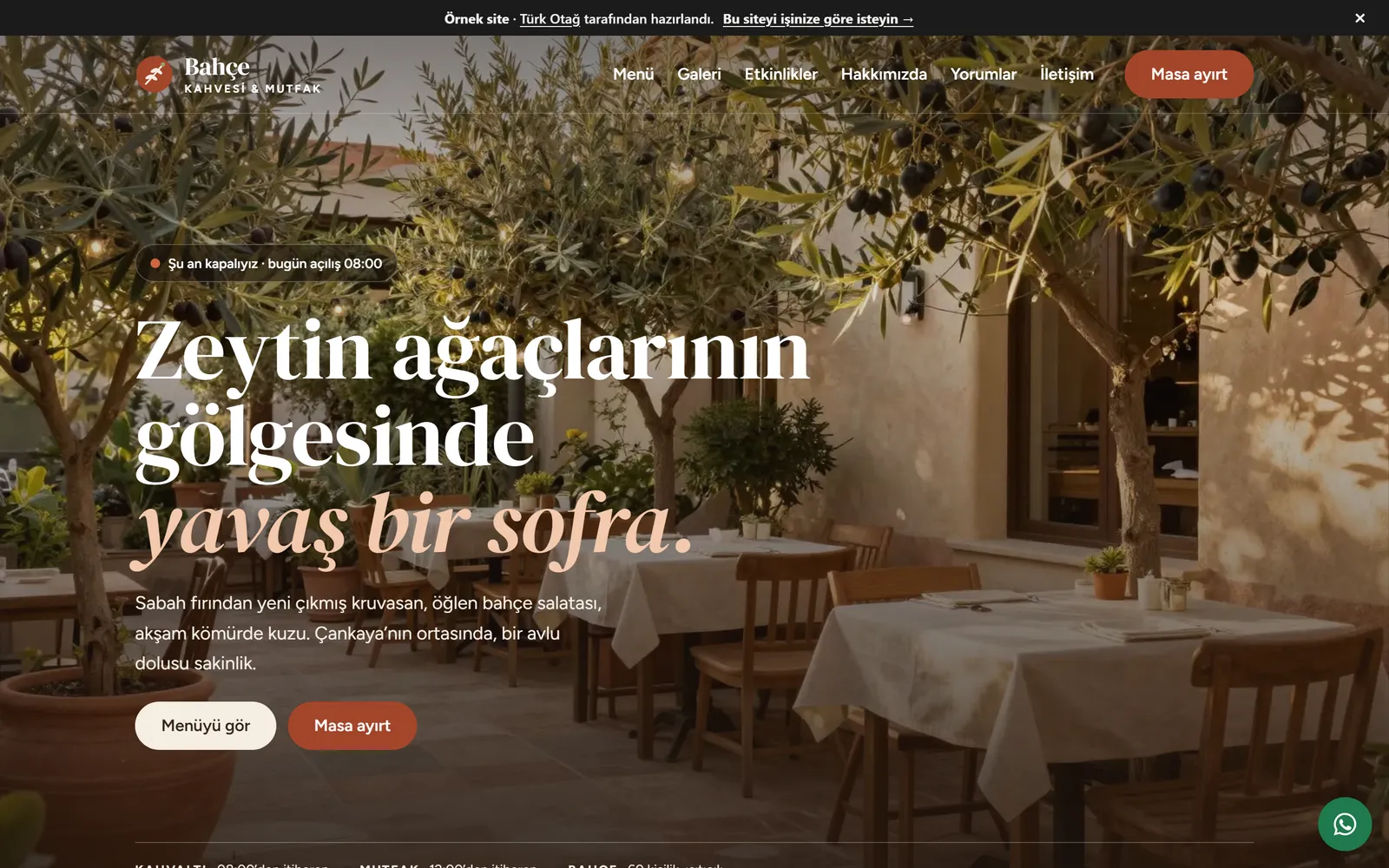
A restaurant website brings your menu, opening hours, location and a way to book together at one address that people can find in search. A café website answers the same questions: Is it open now? What is on? How do I get there? Can I reserve a table? A well-built site answers those four on the first screen and leaves the rest for whoever wants more.
On this page we explain how we work with restaurants, cafés and bakeries. Most of what we describe can be seen live on the example restaurant site we built for an imaginary café and kitchen. It is a Turkish-language site, and its forms send nothing — they simply show the flow. For our general approach and other sectors, see the web design service page.
A QR menu or a website?
We are asked this often, and the answer is usually “both”. A QR menu is a link that opens the menu on the phone of a guest who is already seated. A website does its work before the guest has even set off. The two serve different moments and do different jobs.
| QR menu | Website | |
|---|---|---|
| Who it serves | The guest already at the table | Someone who has not arrived yet and is searching |
| Found in search | Usually not; the menu sits on an app or a service’s address | Menu, hours and location pages are searchable on your own domain |
| Content | Dishes and prices | Menu, bookings, hours, directions, gallery, story, events |
| Bookings | None | A booking request form |
| Brand presence | Limited to the service’s template | In the venue’s own design language |
| Updates | Through the service’s panel | From the menu records; the QR menu can use the same data |
The simplest arrangement is to build the menu once, inside the website, and point the code on the table straight at the site’s menu page. You change a price in one place, and the guest at the table and the person searching see the same menu. We go into this in more detail in a website or a QR menu for your restaurant.
The pages a restaurant website needs
A restaurant site does not have to be long. Each page should answer one question.
- Home. A one-line description of the place, whether it is open right now, today’s suggestions and two clear links — to the menu and to bookings.
- Menu. An online menu with categories and search, comfortable to read on a phone.
- Bookings. A table request.
- Gallery. Photographs of the room and the plates.
- About. The story, the chef, where the ingredients come from.
- Events. Requests for private parties, birthdays and corporate dinners.
- Contact. Address, map, getting there and parking, opening hours, phone number.
- FAQ. Short answers on bookings, allergens, pets, accessibility and the like.
Our example site has all of them: menu, bookings, gallery, about, events, contact and FAQ.
A menu that is easy to update, and how prices are shown
On a restaurant site the menu is usually the page opened most and changed most. A season ends, a dish comes off, a price moves. That is why we build the menu not as an image or a PDF but as individual dish records.
Every dish has the same fields: name, short description, price, labels, an optional photograph and a note (for example “serves two” or “October – February”). Change a price and the menu page and the home page suggestions update together. Depending on what suits you, we set up content files or a simple editing workflow. If you would rather not deal with updates at all, we take them on after launch as part of monthly maintenance.
The problems with a PDF or photographed menu are well known: it has to be pinched and zoomed on a phone, a screen reader cannot read it, and a search engine cannot see the dishes inside it. A menu built as text has none of these problems. On the example menu you can search by dish name or ingredient, pick a category and filter by label.
Price display rules
Most places have rules on how food businesses must display prices, and the website rarely replaces them. In Türkiye, for instance, the Price Label Regulation requires the price list to be shown at the entrance and on the tables; a QR code on the table is allowed, but a printed list must be provided if the guest asks for one, and any service charge or other fee must appear on the list itself. A recent amendment also brings certain businesses into a government electronic price-list system.
A website menu does not replace these obligations — it complements them. Our advice is simple: keep the prices on the site identical to the list in the venue, and if there is any extra charge, state it plainly on the site too. On our example menu, the FAQ makes clear that prices include VAT and that no service charge is added. Check the details that apply to your business with your trade association or legal adviser.
Allergen and dietary labels
Labels such as vegetarian, vegan, gluten-free and spicy help guests find what they are looking for quickly. We show each label both as a short code and in plain words, never relying on colour or an icon alone. Filtering the menu by label takes a single tap.
A label’s limits should be written down too. If a gluten-free dish is prepared in a kitchen that is not gluten-free, saying so protects the guest. The FAQ page on our example site does this in one sentence. Confirm the current requirements for how allergen information must be given with whoever advises you on food regulation.
Booking requests
“Reservation system” tends to suggest something complicated. Most restaurants need something simpler: a request form where the guest can leave a date, time and party size, and where you can confirm and reply.
On the example booking page the guest picks a date, a party size and one of the available times, chooses between garden and dining room, and can leave a note. A summary shows every choice at a glance before anything is sent. Larger groups are pointed to the events request form.
The request reaches you by email or message. If you want to bring order to requests arriving on WhatsApp, our guide to WhatsApp Business API sales automation may help, and online booking systems covers the wider choice. If you already use a reservations platform, we can link to it from the site.
Forms collect personal data — a name, a phone number, sometimes an allergy or a note about a special occasion. So we prepare the form and its privacy notice with data protection law in mind (in Türkiye, KVKK) and ask only for the fields that are genuinely needed.
Gallery, chef and venue
Many people first meet a place through a photograph, which makes the gallery as important as the menu. We do not use stock images; we work with real photographs of the room, the plates and the kitchen. If you do not have any yet, we can brief a shoot.
We convert photographs to modern image formats, produce them at different widths for different screens, and load the ones further down the page only as the visitor approaches them. So the gallery can be full and the page still opens quickly. In the example gallery every photograph can be enlarged and browsed by keyboard.
The story page turns a venue from a place into a table. Who the chef is, where the ingredients come from, what time the oven is lit in the morning. The example about page introduces the chef and the producers in just this way. Those details are also original content that helps people find you in search.
Opening hours and an “open now” indicator
“Are they open?” is one of the questions people most often bring to a café website. Rather than burying the answer in a table, we put it on the first screen.
On our example site’s home page, a small indicator writes a sentence based on the time of day — “Open now · closes 23:00” or “Closed now · opens tomorrow at 08:00”. In the weekly hours table, today’s row is highlighted. Even if scripts do not run in the browser, the table still reads perfectly well; the indicator is only an extra convenience.
We keep the hours in a single record. The home page, the contact page and the structured data given to search engines all draw from it. When hours change for a public holiday or a special day, you update one place.
Being found on the map and in search
Someone looking for a restaurant usually checks the map. Visibility there comes from your own Google Business Profile. The profile lives in your account; you manage reviews, photographs and hours there. The website complements it.
- Identical details. Name, address, phone number and hours are written the same way on the site and on the profile. Search engines trust consistent information.
- Structured data. The business details, menu link and opening hours on the site are marked up so that search engines can read them.
- A link from the profile. The website and menu links on your profile point to your site.
- Speed. A page that opens quickly on a phone does not lose the person checking the menu on the way. Our example restaurant site, alongside our other example sites, scores 96–100 for performance and 100 for accessibility in mobile Lighthouse tests.
- Content. Up-to-date pages — a seasonal menu, an event, the chef’s suggestion — make it easier to appear when people search for your venue or for a dish by name.
We have gathered the technical groundwork in our technical SEO checklist. For the accessibility side, see the accessible websites page; we aim for WCAG 2.2 AA.
Brands with several branches, and how we work
For brands with more than one branch, we recommend a single brand site rather than a separate site for each. Every branch has its own page — address, map, hours, phone number and, where needed, menu differences. The shared menu is entered once and branch-specific changes are marked separately. Each branch can be found when searched for by name, and the brand stays at one address. When a new branch opens, its page is added in the same layout.
For franchising brands the site has one more job: introducing the brand to prospective franchisees. For that we build a separate franchise page — the brand’s story, the branch model, what is sought in a venue and a short application form. The menu and photographs come from the brand site, so every branch uses the same visual language and nobody has to produce their own menu graphics. As the number of branches grows, the structure of the site stays the same; only the list gets longer. FAQs and event details can also be split by branch. When a branch closes or moves, we redirect its old address to the new page, so its place in search and any links pointing to it are not lost.
The work begins with a discovery conversation, remotely or in person, wherever you are. Then come the site map and the design, and once you have approved them, the code is written. We do not use off-the-shelf themes; we build a design system in the venue’s own language. If you wish, we hand over the source code. Why a site needs regular care after launch to stay alive is explained in why website maintenance matters.
If you are curious how we would build a site for the architecture practice that designed your interior, see our page on websites for architecture practices.
Once you have looked round the example site, tell us about your venue — the pages and features you have in mind — and we will reply within two working days. You can also browse more website examples first.
Explore the example site
- Online menu A menu with categories, photographs and search; filter for vegetarian, gluten-free and spicy dishes.
- Booking request Choose a date, party size, time and seating area; add a note and accept the privacy notice.
- Gallery Photographs of the room and the plates; each can be enlarged and browsed by keyboard.
- Story and chef The story of the place, an introduction to the chef and the producers behind the ingredients.
- Events and private dining A request form for private parties, birthdays and corporate dinners.
- Contact and hours Address, map area, getting there and parking, and weekly opening hours.
- FAQ Questions on bookings, allergens, the venue and takeaway, grouped by topic.
Frequently asked questions
We already have a QR menu. Do we still need a website?
A QR menu serves the guest who is already at the table; a website brings in the one who has not yet arrived. To be found in search, take booking requests and show your hours and directions, the site needs pages of its own. Both can draw on the same menu data, so you update a price in one place.
Can we update the menu and prices ourselves?
Yes. We build the menu as individual dish records — name, description, price, labels and an optional photograph. Change a price and the menu page and the suggestions on the home page update together. If you would rather not, we can handle it as part of monthly maintenance.
Does the booking form reserve a table automatically?
The form we build collects a request; you confirm it. The request reaches you by email or message and you reply to the guest. If you already use a reservations platform, we can link to it from the site instead.
How should we show allergen and dietary information?
On the menu we show labels such as vegetarian, gluten-free and spicy both as a short code and in plain words — never by colour alone. It also matters to say what a label does not cover: if the kitchen itself is not gluten-free, say so clearly. Confirm your exact disclosure obligations with whoever advises you on food regulation.
We have several branches. Does each one need its own site?
Usually not. A single brand site gives each branch its own page — address, hours, phone number and any menu differences. Each branch can then be found when someone searches for it by name, whilst the brand stays at one address.
How do we appear on Google and on the map?
Visibility on the map comes from your own Google Business Profile, which stays in your account. We make sure the name, address, phone number and hours on the site match the profile exactly, mark the site up with structured data, and recommend linking from the profile to the site.
Can we publish guest reviews on the site?
You can publish reviews from real guests who have given their permission. Showing when a review was written, and for which visit, builds trust. Inventing reviews — or showing only a hand-picked few — does the opposite.
Further reading
- A website or a QR menu for your restaurant? How they differ and fit togetherRestaurant website or QR menu? A comparison table, using both together, keeping the menu current, reservations and being found on Google.
- Online booking systems for clinics, consultancies and service businessesHow to choose an online booking system: off-the-shelf tool or custom build, essential features, reminders, payments and personal data.
- Technical SEO checklist: getting your website ready for GoogleA technical SEO checklist: crawling and indexing, redirects, titles, Core Web Vitals, structured data and internal links, checked step by step.
- WhatsApp Business API sales automation: a step-by-step guideThe difference between the WhatsApp Business app and the API, set-up steps, template message rules and what to watch when automating your sales flow.
- Why website maintenance matters — and what monthly care involvesWhy websites need maintenance: security updates, backups, speed, technical SEO and content checks — what monthly care covers and how to choose it.
Let’s describe your site together.
Tell us which pages and features you need; we will clarify the scope and reply within two working days.