Websites for real estate and construction
A housing development is seen online long before the sales office opens. We build sites where listings are easy to filter, where a project is explained plainly — from unit types to completion date — and where visitors find their way to the sales office. No off-the-shelf theme; built around your brand.
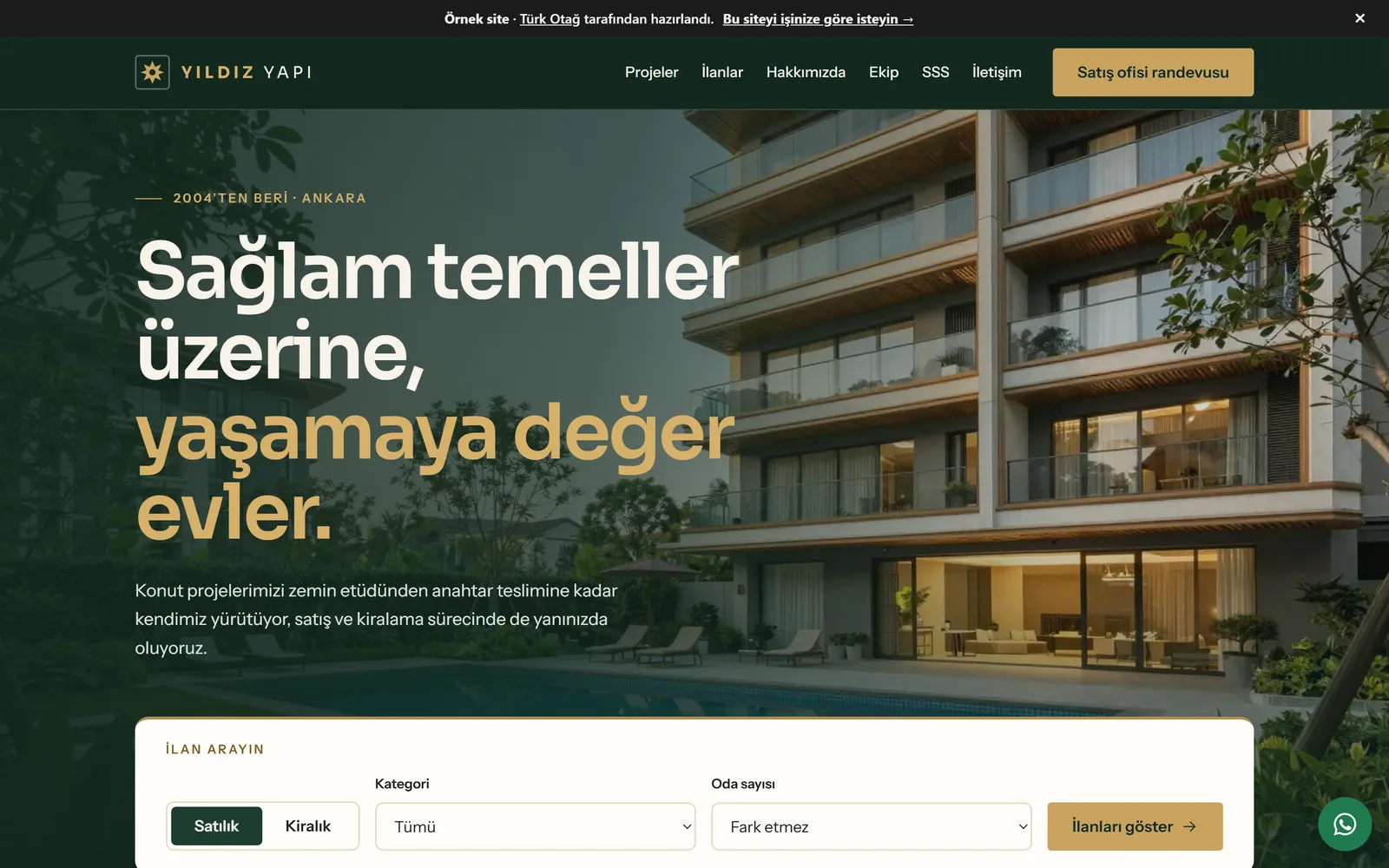
A website for an estate agency, a construction company or a housing development has three jobs to do at once. It should make listings easy to filter. It should explain a development plainly — from unit types to completion date. And it should bring the visitor to the phone, to WhatsApp or to the sales office. On this page we explain how we build such a site, which pages are needed and why, and point you to a live example you can explore.
The example site was made for a fictional firm, Yıldız Yapı: emlak.turkotag.com. It is a Turkish-language demo, but the structure carries over to any market. Listings, developments, team and FAQs work as they would on a real site; the forms simply send nothing. Across our demos, measured mobile Lighthouse scores are 96–100 for performance, 100 for accessibility and 100 for best practices, with layout shift (CLS) below 0.05.
Ready-made estate agency software, or a site built for your brand?
Research into a property website often starts with ready-made software. The package is there, you enter listings, the site goes live. For a single-branch agency with a fast-moving portfolio, that can be a sensible start.
A site built for your brand answers a different need. For a developer or contractor, the site is the showroom that opens before the sales office does. It has to convey the character of the development, its materials and the real state of the building site. That is hard to do amongst hundreds of sites sharing the same template.
| Topic | Ready-made software | Site built for your brand |
|---|---|---|
| Getting started | Quick, template ready | With discovery, design and a content plan |
| Design | As far as the template allows | Shaped around your brand and development |
| Telling a development’s story | Mostly as a listing | Dedicated page structure for unit types, progress and location |
| Speed and accessibility | Down to the software, not in your hands | Measured as we build, aiming for WCAG 2.2 AA |
| Search engines | Shared structure, limited settings | Page titles, structured data and internal links set per development |
| Source code | Usually not yours | Handed over to you if you wish |
Scope decides which route suits you. We compare custom-built sites and ready-made platforms in more detail in WordPress or a custom-built website?, and our general approach is on the web design service page.
Listing pages and filters
Someone looking for a property filters first. For sale or to let, flat or villa, how many rooms, what price range. Filters should ask these questions in order and show the result straight away.
On the example site’s listings page we built:
- Listing type, category, number of rooms, minimum and maximum price. Every field has a visible label, so someone using a screen reader also hears what they are choosing.
- Sorting. Recommended, newest, price and floor area.
- A live result count. A line such as “7 listings shown” changes without reloading the page and is announced to assistive technology.
- Guidance when nothing matches. It suggests loosening the filters and offers a “Tell us what you are looking for” link, so the visitor can let you know what they need.
A shareable search link
As you choose filters, the link in the address bar changes too. A search for three-bedroom flats for sale, for instance, becomes this address: emlak.turkotag.com/ilanlar?tip=satilik&oda=3. It is a small detail that earns its keep in sales. An agent sends a client a single link — “the listings that suit you are here” — and the client forwards the same search to their partner. The search box on the home page links to this page in the same way.
What a listing page should hold
A listing page should gather enough to make a decision on one screen. Photo gallery, price, listing number and date, gross and net floor area, floor, age of the building, service charge, heating and a list of features. Alongside: the agent’s name and photo, call and WhatsApp buttons, and a viewing appointment. Below: similar listings.
Rules on property advertising also shape what goes on this page. In Türkiye, for example, the Regulation on Real Estate Trade requires sale and rental listings — online ones included — to show the authorisation certificate number and contact details legibly. The regulation has been amended since publication; the current Turkish text is on mevzuat.gov.tr. Wherever such a requirement applies, we give this information a fixed place in the listing template, so it never goes missing from a listing. Please confirm the detail of your obligations with the relevant authority or your legal adviser.
Mortgage calculator
The calculator on the listing page shows an approximate monthly payment based on deposit, term and monthly interest rate. It is useful, but it can also set the wrong expectations. So we put a plain note beneath it: the figure is approximate and illustrative. Taxes, arrangement fees, valuation and insurance are not included. The lender decides the amount available and the rate. As the numbers change, the result updates without reloading the page and is announced to screen readers.
The housing development page: unit types, location, progress
For a developer, the development page is the most valuable page on the site. The example Yıldız Park Evleri page runs in this order:
- Cover and key facts. Development name, status (on sale, under construction, completed), plot area, number of blocks and units, share of green space, number of storeys.
- The story of the development. Two or three paragraphs. Why this plot, why this layout, how ground surveys and building inspection are handled.
- Unit types. From one-bedroom flats to garden duplexes, each type’s gross and net area, room layout and sales status in a single table. Statuses such as “Last 6 units” or “Sold out” show here. We add your floor plans beside each type — zoomable, and with a text description.
- Shared amenities. Pool, parking, gym, security, insulation. Each with a short line and a simple icon.
- Location and surroundings. A map and approximate distances to schools, shops, hospitals and the like.
- Latest from the site. Progress percentage and a dated list of stages: completed ones ticked, upcoming ones with their expected dates.
- Completion date and sales office visit. A short form that stays fixed in the side column.
- Listings in the development. Units for sale linked to that development.
For developments under construction, the progress section is the part of the site that builds the most trust. As on the Yıldız Kule page, a percentage and stage list updated each month answers “how is the build going?” before anyone picks up the phone. If the completion date changes, saying so openly is better than staying silent.
Completed developments remain on the developments page. When a new development goes on sale, past handovers are the strongest reference you have. We cover the role a development site plays before sales begin in Websites for housing projects.
Working alongside portal listings
Property portals bring a great many visitors, and they will go on doing so. Your own site does not replace them. The two do different jobs.
- A portal reaches a wide audience. Visitors see many agencies side by side.
- Your own site tells your brand’s story. Visitors see only your portfolio, your developments and your team.
There are a few ways to use both together. You can add the address of the development page on your site to the portal listing’s description. The QR code on business cards, hoardings and brochures can point to your site rather than the portal. If a portal offers a way to import listings and your contract allows it, we can look together at managing listing data from one place. We examine this portal by portal and make no promises up front.
To be found in search, each development needs its own address, title and description. Someone searching for the development’s name should land directly on its page. We also add structured data to the pages, which helps search engines understand whether a page is about a company, a development or a listing. If you are redesigning an existing site, we plan redirects for the old addresses; the detail is in Redesigning a website without losing your Google rankings.
Contact that leads to the sales office
In property, decisions are mostly made face to face. The site should make that meeting easier. The example contact page shows the head office and the sales office separately, lists opening hours day by day, and lets the visitor leave a visit request by choosing which development they want to see.
We also spread contact through the pages themselves:
- On a listing page, call and WhatsApp buttons for the agent. On your own site, the WhatsApp message starts with the listing number, so the agent need not ask which property is meant.
- On a development page, a sales office visit form. Name, phone, preferred day. Nothing more.
- On mobile, call and directions buttons sit within reach of the thumb.
- Enquiries go to the email address you choose or to the tool your sales team uses.
Forms ask only for what is needed and link to a privacy notice. Consent to marketing messages is a separate, optional tick. In Türkiye this is governed by the personal data protection law, KVKK; elsewhere we follow the rules that apply to you. If you would like to handle WhatsApp enquiries in a more orderly way, we also work on that side — see WhatsApp Business API sales automation and our custom software service.
The pages a real estate and construction site needs
The page structure of the example site is a good starting point for most firms:
| Page | What it does | In the example |
|---|---|---|
| Home | Quick search, featured developments and listings, the firm’s approach | Home |
| Developments | On sale, under construction and completed | Developments |
| Development detail | Unit types, location, progress, completion, visit form | Yıldız Park Evleri |
| Listings | Filterable, shareable search | Listings |
| Listing detail | Details, gallery, agent, appointment, mortgage estimate | Example listing |
| About | Founding, history, principles | About |
| Team | Engineers and agents, their areas of expertise | Team |
| FAQs | Title deeds, mortgages, handover, lettings | FAQs |
| Contact | Offices, hours, location, visit request | Contact |
The FAQ page is especially valuable in property. What the different stages of title mean, why the occupancy certificate matters, what happens if handover is late — every buyer has these questions in mind. Answering them in plain language eases the load on the sales team and reaches the people asking those questions in search. We have gathered the pages a business website generally needs in The pages every business website needs.
Large photographs, fast pages
In property, the image is everything. The living room, the kitchen, the view from the balcony, the blocks in evening light. But large photographs need not mean slow pages.
We convert photographs to modern formats and serve them at the right size for each screen. Images outside the visible screen load only when their turn comes. Because each image’s dimensions are declared in advance, content does not jump about whilst the page loads. We write alternative text for every photograph describing what it shows — “blocks overlooking the pool and landscaped grounds”, for instance. That matters both for visitors with visual impairments and for image search. Why speed matters, and how we measure it, is covered in Why is my website slow?
We take a similar approach in another photograph-led field. The architectural side of telling a project’s story is on our architecture practices page.
How we work
- Discovery. We listen to how your firm, your developments and your sales process work. We learn how you use portals and how the team manages listings.
- Page and content plan. Together we decide which developments, which unit types and which questions will appear on the site.
- Design. A design system made for your brand — colour, type, photographic language.
- Build and measurement. Speed, accessibility and search settings are measured on every page.
- Launch and care. After launch, with an optional monthly maintenance plan, we stay alongside you for listing, development and progress updates.
To describe what you need, get in touch — tell us about your firm, the pages and features you have in mind, and we will reply within two working days.
Explore the example site
- Filterable listings Filter by type, category, number of rooms and price range. The chosen filters are written into the address bar, so a search can be shared as a link.
- Listing page Photo gallery, property details, agent card, viewing appointment and an approximate mortgage calculator.
- Developments Developments on sale, under construction and completed — each shown with its status.
- Housing development page Unit types table, shared amenities, location and surroundings, build progress, completion date and a sales office visit form.
- Development under construction Progress percentage and a dated list of completed and upcoming stages.
- Frequently asked questions Questions grouped under title deeds, mortgages, handover and lettings.
- Contact Head office and sales office, opening hours, location and a visit request where the visitor picks a development.
Frequently asked questions
Why commission a custom site rather than use ready-made estate agency software?
Ready-made software gets you started quickly and is enough for many agencies. A custom site suits you better if you want your brand to stand out, a development told in its own voice, and control over page speed, accessibility and how you appear in search. If you wish, the source code is handed over to you.
Will we still need to post listings on property portals?
Yes — portals will keep bringing visitors. Your own site does not replace them; it complements them. If a portal offers a way to import listings and your contract allows it, we can look together at managing listing data from one place.
Can we update listings and developments ourselves?
Yes. We set up an editing route suited to your needs for adding listings, changing prices and status, and uploading photos. Marking a unit as sold or updating a completion date should take a few minutes.
Do listings need to show a licence or registration number?
That depends on where you operate. In Türkiye, the Regulation on Real Estate Trade requires the authorisation certificate number to appear legibly in listings and advertisements, online included. Wherever such a rule applies, we give the field a fixed place in the listing template. Please confirm your current obligations with the relevant authority or your legal adviser.
Does the mortgage calculator show an exact monthly payment?
No. It shows an approximate monthly payment based on deposit, term and interest rate. Taxes, fees and insurance are not included, and the lender sets the actual figure. A note saying so sits directly beneath the calculator.
Is it worth launching a site whilst the development is still under construction?
Yes — often that is the right moment. The development page gathers early interest, and regular progress updates build trust. After handover the page moves to completed developments and stays on as a reference.
Does each development need its own domain?
No. Keeping development pages under your company site holds the value built up in search at a single address. If a large development calls for a separate showcase site, it can be built linked to the main site and on the same design system.
How is personal data from the forms protected?
Forms ask only for what is needed, link to a privacy notice and send enquiries to the address you choose. Consent to marketing is a separate, optional tick. In Türkiye this follows the data protection law (KVKK); elsewhere we work to the rules that apply to you.
Further reading
- Websites for housing projects: the showroom before the sales officeWhat a housing development website needs: unit types, floor plans, location, construction progress, handover dates, sales-office visits and listings.
- WordPress or a custom-built website? How to make the right callWordPress or a custom-built website? We compare both on speed, security, maintenance, content editing and ownership, and explain when each is the right call.
- Redesigning a website without losing your Google rankingsHow to keep your Google rankings through a redesign: an address-mapping table, 301 redirects, content mapping, Search Console and monitoring after launch.
- The pages every business website needs: a checklistThe pages every business website needs: home, about, services, team, case studies, FAQ, articles, contact, legal pages and a 404 — page by page.
- Why is my website slow? Why speed matters, how to measure it, how to fix itA guide to website speed: Core Web Vitals thresholds, measuring with PageSpeed Insights and Search Console, common causes of slowness and how to fix them.
Let’s describe your site together.
Tell us which pages and features you need; we will clarify the scope and reply within two working days.